Multi-Platform Social Media CRM for DMs: Eliminate Inbox Chaos & Close More Deals
How to Eliminate Inbox Chaos and Turn Conversations Into Revenue
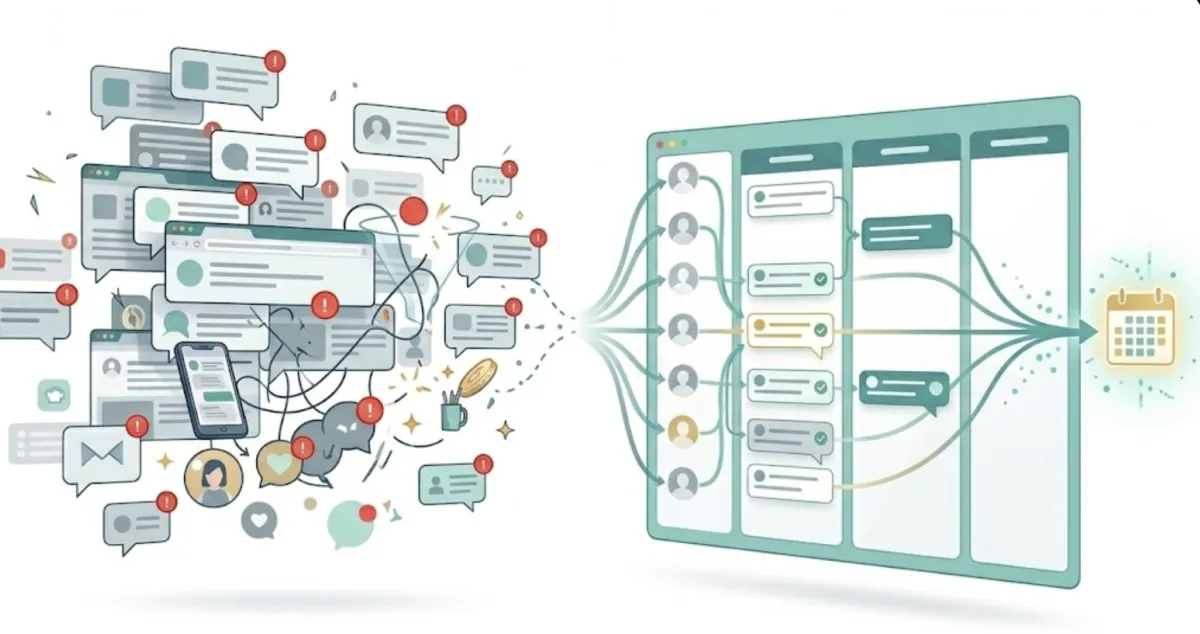
Your inbox isn’t the problem.
Fragmentation is.
You’ve got:
LinkedIn DMs
Instagram messages
Facebook Messenger
X notifications
YouTube comments
Maybe even TikTok
All holding pieces of your pipeline.
And none of them talking to each other.
So every day feels reactive.
You’re busy.
But pipeline feels random.
Familiar?
The Hidden Cost of Messy Social Media Inboxes
Messy inboxes don’t just feel stressful.
They quietly cost you money.
When conversations live across multiple platforms:
Follow-ups get missed
Warm leads go cold
Qualification details aren’t tracked
Context gets lost
Revenue slips through cracks
You’re not losing because your offer is weak.
You’re losing because your system is fragmented.
What Is a Multi-Platform Social Media CRM for DMs?
It’s not just “an inbox tool.”
It’s a centralized command center for social prospecting.
A true multi-platform social media CRM does five core things:
1. Centralizes All Conversations
Every DM from every platform flows into one unified dashboard.
No more jumping tabs.
No more platform hopping.
One view. Total clarity.
2. Organizes Conversations by Stage
Instead of scrolling endlessly, you move conversations through stages:
New
Replied
Qualified
Booked Call
Closed
Now you can see pipeline, not just messages.
3. Tracks Context and History
A proper CRM for DMs stores:
Past conversations
Tags
Notes
Qualification data
Follow-up reminders
So you never forget who said what.
Ever again.
4. Automates Smartly (Without Sounding Robotic)
Automation shouldn’t mean spam.
It should mean:
Suggested responses
Follow-up reminders
Trigger-based nudges
AI-assisted drafting
But with human oversight.
Because trust still closes deals.
5. Provides Performance Data
Without data, you’re guessing.
With the right system, you can track:
Reply rates by platform
Conversion rates by stage
Average time to booked call
Drop-off points in conversation
Now you can optimize.
Instead of hope.
Why Overwhelm Happens
Overwhelm isn’t about message volume.
It’s about decision fatigue.
When DMs are scattered...
You don’t know who needs attention first.
You don’t know who’s hot.
You don’t know who’s ghosting.
So you procrastinate.
Not because you’re lazy.
Because your brain hates chaos.
A multi-platform CRM removes cognitive clutter.
And clarity increases action.
From Reactive Messaging to Engineered Prospecting
Reactive:
“I’ll reply when I see it.”
Engineered:
“Every conversation moves through a defined pipeline daily.”
That’s the shift.
When you treat DMs like assets, not notifications, revenue becomes predictable.
The Modern Reality of Social Prospecting
Your prospects don’t live on one platform.
They live everywhere.
And they respond on different channels depending on context.
If your messaging system isn’t unified:
Your follow-up isn’t consistent.
Your qualification isn’t structured.
Your pipeline isn’t visible.
And visibility drives control.
What Happens When You Centralize Everything
You gain:
Clarity
Speed
Consistency
Data
Confidence
Instead of:
Stress
Missed messages
Scattered follow-ups
Revenue leaks
The difference isn’t effort.
It’s infrastructure.
AI + Human: The Winning Combination
AI can:
Draft replies
Summarize threads
Suggest next steps
Flag buying signals
But humans decide:
Tone
Timing
Escalation
Call invites
A multi-platform CRM should empower both.
Automation without intelligence feels spammy.
Human-only workflows don’t scale.
Hybrid systems win.
Signs You Need a Unified DM CRM
If any of these sound familiar:
You check 3–5 platforms daily
You forget to follow up
You lose track of qualified leads
You don’t know your DM conversion rate
Your inbox feels overwhelming
You don’t need more hustle.
You need structure.
The Future of Social Selling
Social selling isn’t slowing down.
It’s accelerating.
More platforms.
More messages.
More noise.
The winners won’t be the loudest.
They’ll be the most organized.
The ones who centralize conversations, structure pipelines, and optimize messaging flows.
Because your inbox isn’t chaos.
It’s opportunity.
But only if it’s unified.
Final Thought
If you feel overwhelmed by messy social media inboxes, that’s not a motivation problem.
It’s a systems problem.
Build a multi-platform social media CRM for your DMs.
Centralize.
Organize.
Track.
Optimize.
Then scale.
Your pipeline will thank you.
Happy Selling,
-sean 🔥🕺
P.S. If you're wanting a true "Sell by Chat®" system, check out this article. CLICK HERE.


